
Views: 0 Author: Site Editor Publish Time: 2025-11-26 Origin: Site
Plastic extrusion machines are essential tools in the production of various plastic products, from pipes and sheets to profiles and films. These machines are designed to melt and shape plastic materials into continuous forms, which are then cooled and cut into specific shapes. However, like any piece of industrial machinery, extrusion machines can encounter issues that affect their performance. Proper maintenance and troubleshooting are essential to keeping your equipment running smoothly, preventing costly downtime, and ensuring the quality of your end products.
One of the most common issues with extrusion machines is poor material flow, which can result in inconsistent output or even machine stoppage. Blockages can occur in several areas of the extrusion system, such as the hopper, barrel, screw, or die.
Possible Causes:
Clogged Hopper or Feed Throat: If there is insufficient material feeding into the machine or if the hopper becomes clogged, this can impede the material flow. Dust, dirt, or foreign particles can accumulate and cause blockages.
Screw or Barrel Build-up: Over time, plastic materials can degrade and accumulate on the screw or barrel, leading to inconsistent material flow. This is especially common with thermoplastics that decompose or degrade when exposed to heat for too long.
Die Blockage: The die is responsible for shaping the molten plastic. Any material build-up or residue inside the die can obstruct the flow, leading to uneven extrusion and product defects.
Troubleshooting Steps:
Regularly clean the hopper, feed throat, and die to prevent material build-up.
Check the screw and barrel for signs of degradation, corrosion, or wear. Clean them regularly to ensure smooth operation.
Use high-quality, clean raw materials to prevent contamination and blockages.
Conduct routine checks for wear and tear in key components and replace them when necessary.
Inconsistent product quality is a common challenge for extrusion machine operators, and it can significantly affect both the machine’s performance and the final product. This issue can manifest in various ways, such as warping, surface imperfections, or inconsistencies in size, thickness, or shape. These quality issues often arise from malfunctioning machine settings, inadequate maintenance, or improper handling during the extrusion process.
Possible Causes:
Temperature Variations: The temperature of the barrel, screw, and die plays a critical role in the extrusion process. Proper temperature control ensures that the material melts evenly and flows smoothly. If the temperature fluctuates, either too high or too low, it can lead to inconsistent extrusion. For example, if the material doesn't melt uniformly, it may result in areas of the product being thicker or thinner than desired.
Screw Speed or Pressure Issues: The screw speed and the pressure at which material is forced through the extruder are crucial to maintaining a steady flow. If the screw speed is too fast or too slow, or if the pressure is uneven, the material may not pass through the die uniformly. This can lead to inconsistencies in the thickness, width, or shape of the extruded product.
Inadequate Cooling: After extrusion, the plastic must be cooled evenly to ensure that it maintains its shape and dimensions. Cooling is a critical step in solidifying the material and setting it in the desired form. If the cooling system is malfunctioning or improperly calibrated, it can lead to uneven cooling, causing warping, distortion, or surface roughness.
Troubleshooting Steps:
Monitor and Control Temperature: Regularly monitor the temperature of the barrel, screw, and die to ensure that they are operating within the correct temperature range. If you notice temperature fluctuations, check for faulty heating elements, thermocouples, or controllers. Ensure that each heating zone is calibrated properly and that temperature inconsistencies are eliminated. Keeping the system temperature consistent is key to maintaining product quality.
Adjust Screw Speed and Pressure: Fine-tune the screw speed and pressure according to the material specifications and product requirements. Ensure that the screw speed is optimal for the material’s viscosity, and adjust pressure settings to ensure the material flows smoothly through the die. Check the pressure gauges regularly to ensure uniform pressure across the system, which will help prevent variations in thickness and shape.
Check the Cooling System: Inspect the cooling system to make sure it is functioning properly. Look for any leaks, blockages, or malfunctions that may be preventing the cooling water or air from circulating effectively. Ensure that the cooling system is distributing water or air evenly across the extruded material, and that the temperature of the cooling fluid is at the optimal level for the material being processed. Proper cooling will help maintain the shape and surface quality of the final product.
Overheating of the extrusion machine is another common problem that can negatively affect both the machine’s performance and the quality of the product. Excessive heat can cause the plastic material to degrade, resulting in defects such as discoloration, brittleness, or loss of material properties. Additionally, the increased temperature can cause damage to the extruder itself, shortening its lifespan and requiring costly repairs or replacements.
Possible Causes:
Improper Temperature Control: If the temperature settings for the barrel, screw, or die are too high, the plastic can overheat and degrade.
Inadequate Cooling System: If the cooling system is malfunctioning, the extruder may not be able to maintain proper operating temperatures, leading to overheating.
Inconsistent Material Flow: If the material flow is blocked or restricted, the extruder may overheat as it works harder to push the material through the system.
Troubleshooting Steps:
Regularly check and calibrate temperature sensors and controllers to ensure they are reading and regulating the temperature correctly.
Inspect the cooling system for any issues, such as clogged pipes or malfunctioning fans, and replace or repair parts as necessary.
Keep the machine clean to ensure efficient material flow. Remove any blockages or obstructions that may be causing excessive strain on the extruder.
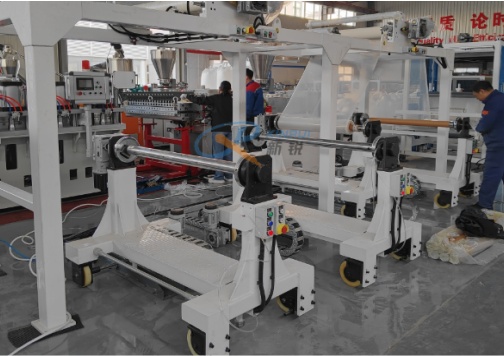
The screw is one of the most critical components of the extrusion machine, as it is responsible for melting and feeding the material through the barrel and die. Over time, the screw can experience wear and tear, which can lead to a decrease in performance, uneven material flow, and potential damage to the machine.
Possible Causes:
Material Abrasiveness: Certain types of plastic materials, particularly those with high filler content, can cause excessive wear on the screw.
Incorrect Screw Design: The screw must be designed correctly for the material being processed. Using the wrong screw design for a particular application can lead to uneven wear and reduced performance.
Inadequate Lubrication: If the screw isn’t properly lubricated, it can cause friction, leading to wear and tear on the component.
Troubleshooting Steps:
Regularly inspect the screw for signs of wear or damage. If necessary, replace the screw or refurbish it to restore optimal performance.
Ensure the right screw design is being used for the materials you are processing.
Lubricate the screw and other moving parts regularly to reduce friction and wear.
Extrusion machines rely on a sophisticated control system to regulate parameters such as temperature, screw speed, and pressure. If there are issues with the electrical system or control components, it can cause the machine to operate erratically or even stop functioning altogether.
Possible Causes:
Faulty Sensors or Controllers: If the sensors or controllers that regulate temperature, pressure, or screw speed fail, the machine may not function as intended.
Electrical Short Circuits or Failures: A short circuit or failure in the electrical wiring can disrupt the machine’s operation.
Software Malfunctions: If the control system software is outdated or malfunctioning, it can lead to errors in operation.
Troubleshooting Steps:
Perform regular checks on the electrical system, including sensors, controllers, wiring, and software.
Replace faulty sensors or controllers immediately to avoid operational disruptions.
Ensure that the software is up to date and that the control system is calibrated correctly.
Excessive vibration and noise can be indicators of underlying problems in the extrusion machine. These issues can arise from various sources, including imbalanced rotating parts, misalignment, or wear in key components like the bearings.
Possible Causes:
Imbalanced Screw or Motor: An imbalanced screw or motor can cause excessive vibration during operation, which may lead to further damage.
Worn Bearings: Bearings are responsible for supporting rotating parts and ensuring smooth operation. Worn bearings can create noise and cause misalignment.
Misalignment of Components: If components like the screw, barrel, or die are misaligned, it can lead to vibration, noise, and uneven extrusion.
Troubleshooting Steps:
Inspect the screw, motor, and bearings for signs of wear or imbalance. Replace or realign components as necessary.
Ensure that the machine is properly calibrated and aligned, with all parts working in harmony.
Lubricate moving parts to reduce friction and noise.
Proper maintenance and timely troubleshooting are essential for keeping your plastic extrusion machine running efficiently and preventing costly downtime. By regularly inspecting key components, adjusting settings, and addressing issues promptly, you can extend the lifespan of your machine and maintain consistent product quality.
If you encounter persistent issues or require expert assistance in troubleshooting or maintaining your plastic extrusion machinery, Qingdao Xinrui Plastic Machinery Co., Ltd. offers reliable solutions and support. Their team of experts can provide tailored advice, high-quality machinery, and maintenance services to keep your production line running smoothly. For more information or to get in touch with their professional team, visit Qingdao Xinrui Plastic Machinery Co., Ltd. to learn more about their offerings and how they can assist you.


